Soulframe Crafting Resources & Farming Planner
Add the items you want and the Planner turns them into a farming list: every resource and fragment they need, where it drops and who sells it. The Resources tab shows what you have next to what you need, green or red at a glance.
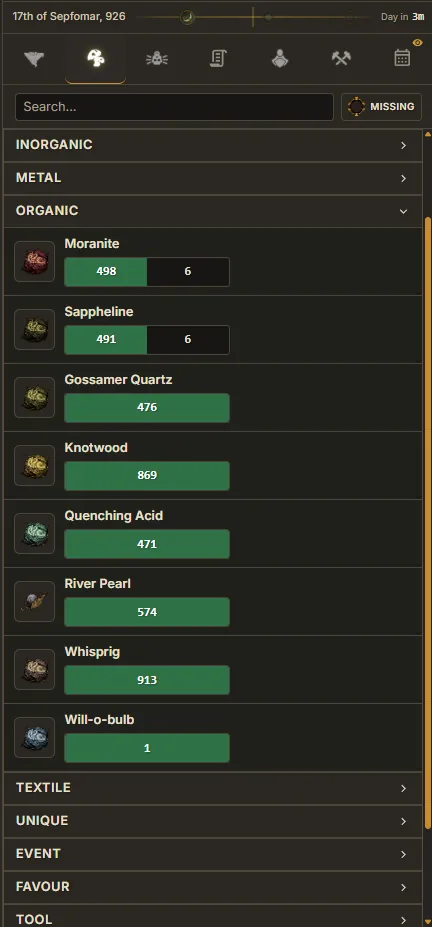
Crafting Resources
The Resources tab tallies how many of each crafting material you need across all your tracked recipes, and shows how many you currently have. Spot shortfalls at a glance.
Have and Need
A resource something needs shows what you have next to what you need, green when you have enough and red when you are short. Resources nothing needs show a plain count.
Live Counts
When synced, resource counts update automatically. No manual entry needed.
Show Missing Only
Toggle the Missing switch next to the search bar to hide resources you already have enough of. Great for making a focused farming list.
Rows and Columns
Each resource is one line. Make the sidebar wider and the list flows into more columns.
Details
Click a resource to see where it drops, which vendors sell it and what it is used to craft.
Planner
The Planner tab turns a wish list into a farming list: add the items you want and it shows what to farm and where.
Adding Items
Right-click an item in your Collection and choose Add to planner. Mastery Helper can add everything you are missing in one go.
Sources
Each item lists the resources and fragments it needs with their drop sources. You can pick one source to use for everything it covers.
FAQ
Where does a Soulframe crafting material drop?
Click any resource in Little Genius to see where it drops, which vendors sell it and what it is used to craft.
Ready to try it?
Little Genius is free. Download the desktop app for Windows or Linux and your collection keeps itself up to date, or use Lite Genius in your browser.
Get Little Genius Is it safe? Read the FAQ →