Soulframe Item Chest: Every Weapon Copy, Temper & Rarity
The Item Chest lists every individual weapon copy you own, not just one per type, with its quality, every temper it rolled and its Moonsteel status. Filter and sort to find the roll you are after, and get an alert when a matching weapon drops.
Desktop app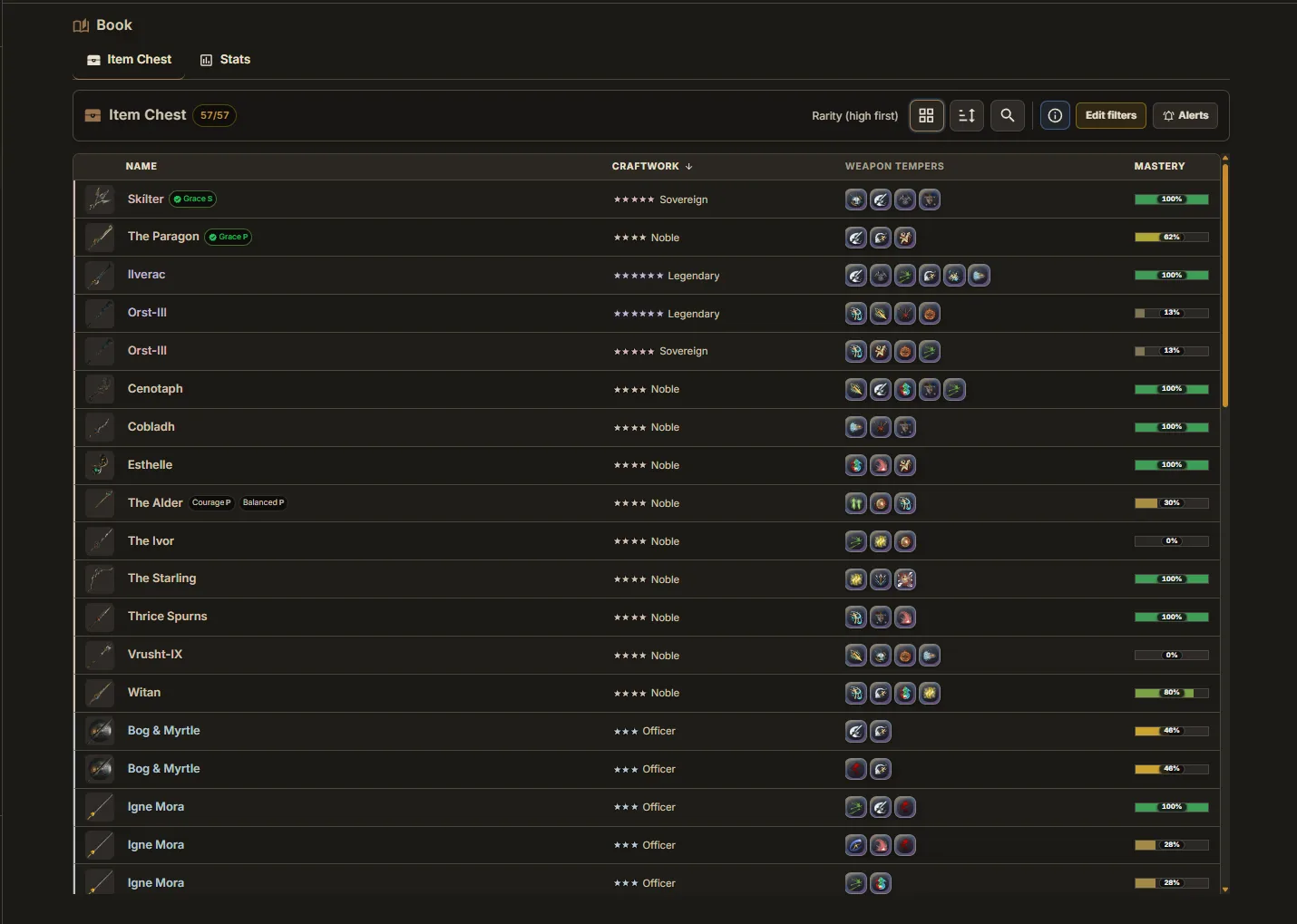
Item Chest
The Item Chest is the first tab of the Codex. It shows every weapon copy in your inventory with its quality, tempers and Moonsteel status.
What's in Your Chest
Unlike the catalog (which tracks one entry per weapon type), the Item Chest shows every individual copy you own — including duplicates with different quality tiers or tempers.
Filters
Edit filters narrows the chest by weapon, rarity tier, tempers and Moonsteel. Click a temper once to require it and again to require it doubled. Filters combine.
Sorting
Sort by name, when the item was dropped (newest or oldest), mastery XP progress, or rarity. Useful for finding your oldest duplicate when deciding what to keep.
Weapon Detail
Click a weapon to open its detail view with every temper it rolled. Chest statistics gives totals for what is currently shown.
Grid or List
The toggle in the toolbar switches between cards and a compact sortable table.
Drop Alerts
Little Genius can notify you about new weapons: one alert for drops that match your chest alert filters and one for Moonsteel. Both are switched under Settings, Notifications. A weapon you receive in a trade does not count as a drop.
Tuvalkane
Tuvalkane is the second tab of the Codex: your crafting record with the smith.
Rank & XP
The header shows your rank with Tuvalkane and the XP behind it.
Crafted Qualities
Each weapon shows which quality tiers you have crafted. Click one for the full list.
Epithets
The Epithets section lists every weapon epithet with its unlock condition and your progress. Unfinished ones sort to the top, closest first.
FAQ
Can I filter my weapons by temper?
Yes. Edit filters narrows the chest by weapon, rarity tier, tempers and Moonsteel. Click a temper once to require it.
Ready to try it?
Little Genius is free. Download the desktop app for Windows or Linux and your collection keeps itself up to date, or use Lite Genius in your browser.
Get Little Genius Is it safe? Read the FAQ →